Reproduction Parts for 1916-1964 Chevrolet Passenger Cars & 1918-1987 Chevrolet & GMC Trucks SHOP ONLINE | ONLINE CATALOG | ABOUT US

When becoming a new member, the format asked me for a display Nickname BUT my first post shows my actual full name as the post host. So, how do I set my account to show my Nickname and not my full name? I do not see anything regarding this in my account profile to fulfill this request. Thanks

You should be able to change that in your account settings. Click the My Profile/Account button at the top of the page or click the down arrow/gear icon below your name to the left of your post. You should be able to set your Display Name there.
7046 old site posts
Save a life, adopt a senior shelter pet
There are many good people. If you can't find one, be one.
1938 Master Business Coupe-Sold, now living in New Jersey
1953 210 Sedan

Hi Gary
Just to add a little to Tiny's excellent answer...
I have no idea what the "Nickname" is for, or where it even shows up in posts.
But, in case you are interested, anything you enter in the "Signature" area of your profile will show up in small letters at the bottom of every post you make
Ole S Olson
Saskatoon, Sask, Canada
1946 DR 3/4 ton stake
1139 old site posts

To clarify further, there are two 'profiles':
1. One profile is for the VCCA website in general (called the Member Dashboard). Click on Member Dashboard at top, right side of every page within the VCCA website to access the dashboard. See the RED circle in the first screen shot below.
2. The other profile is for just the forums. This is accessed by clicking on the My Profile button in the forum header. See the GREEN circle in the following screen capture.
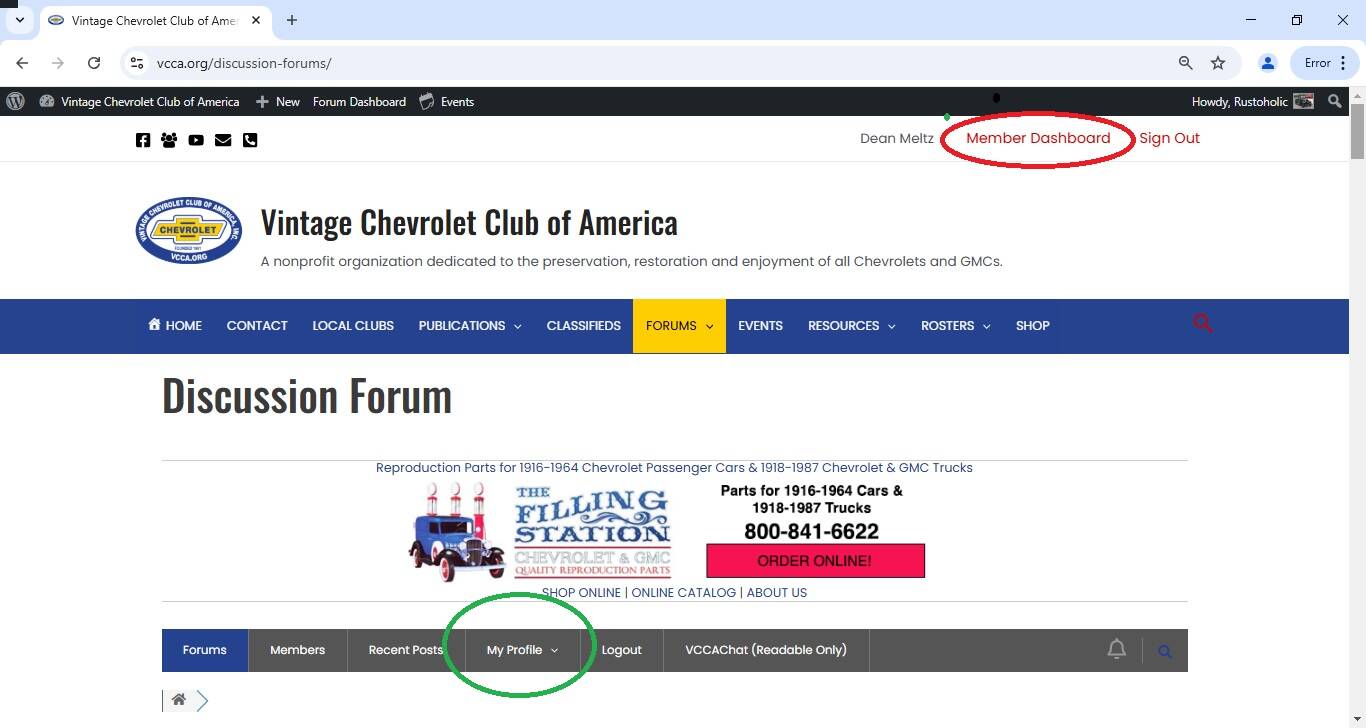
The forum profile is where you set your Display Name and your Nickname.
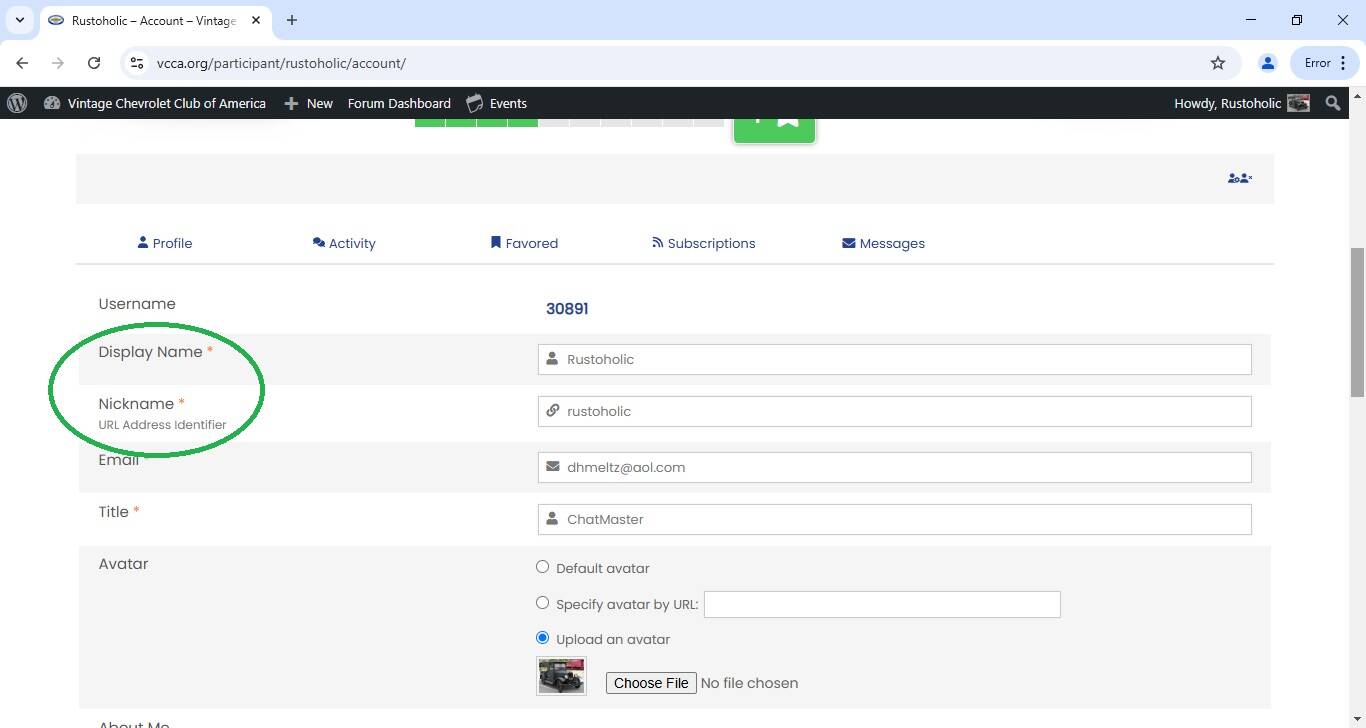
The Display Name is the name you are known by in the forums. It's the name that appears under your avatar. For example, My Display Name is Rustoholic, with a capital R.
The Nickname is the URL address identifier. It is the character string that appears after the @ sign under your avatar. For example, my forum nickname identifier is rustoholic, with a lower case r. The Nickname is used when someone wants to give a shout out to you in their post. By including a @nickname in your post, the website will automagically send that person an email, which tells them that they've been mentioned in a post.
Here's a screen shot of the forum profile, with Display Name and Nickname circled in GREEN. You can edit the values for the Display Name and the Nickname.
Hope this helps. Dean
Dean "Rustoholic" Meltz
San Leandro, CA
3511 posts on vccachat.org
Lurch -1927 LM one ton truck - tinyurl.com/Lurch-VCCACHAT-Gallery
Justin - 1928 AB Canopy Express (1/2 ton truck) - tinyurl.com/Justin-Stovebolt-Gallery
Thank you all for your help. With your help I have successfully made my change as I needed. Now, on with the show (newbie here)!

Reviving this thread because I really can't seem to remove my full name /change my display name even when attempting to follow method 2 described below. I simply don't get to a screen that allows me to edit anything. Please help....
To clarify further, there are two 'profiles':
1. One profile is for the VCCA website in general (called the Member Dashboard). Click on Member Dashboard at top, right side of every page within the VCCA website to access the dashboard. See the RED circle in the first screen shot below.
2. The other profile is for just the forums. This is accessed by clicking on the My Profile button in the forum header. See the GREEN circle in
@53handyman, I see that the above post is your fifth post to the forums. I believe that everyone needs to make five posts in order to have full forum privileges.
Now that you've made your fifth post, try clicking on My Profile and see if the profile screen comes up.
Dean
Dean "Rustoholic" Meltz
San Leandro, CA
3511 posts on vccachat.org
Lurch -1927 LM one ton truck - tinyurl.com/Lurch-VCCACHAT-Gallery
Justin - 1928 AB Canopy Express (1/2 ton truck) - tinyurl.com/Justin-Stovebolt-Gallery
@53handyman, I see that the above post is your fifth post to the forums. I believe that everyone needs to make five posts in order to have full forum privileges.
Now that you've made your fifth post, try clicking on My Profile and see if the profile screen comes up.
Dean
Thanks Dean, but, nope- I still can't make screen name changes from MyProfile... Sigh,
@tiny, @53handyman made a sixth post (above) that needed moderation (approval), which I provided.
I thought folks got fully vetted after five posts. Got any ideas?
Thanks, Dean
Dean "Rustoholic" Meltz
San Leandro, CA
3511 posts on vccachat.org
Lurch -1927 LM one ton truck - tinyurl.com/Lurch-VCCACHAT-Gallery
Justin - 1928 AB Canopy Express (1/2 ton truck) - tinyurl.com/Justin-Stovebolt-Gallery
@rustoholic I don't. Maybe try it again? I just noticed that the down arrow below user's name that opened a context menu is no longer there. I don't think Peter made any changes, at least not intentionally. He's had almost no help from the software support folks in trying to fix the many issues the software has. I'm not a fan of this software.
7046 old site posts
Save a life, adopt a senior shelter pet
There are many good people. If you can't find one, be one.
1938 Master Business Coupe-Sold, now living in New Jersey
1953 210 Sedan


I manually approved moderated posts a few days ago so this particular issue should be resolved.
Like Tiny, I'm not thrilled with the lack of support from the software vendor. Pondering solutions to this and the migration of the old forum.
VCCA Member Services
memberservices@vcca.org
708-455-8222
I'll try a post, here, and see about the moderation issue, but the display name issue remains a mystery. At least now some random number appears as my display name (at least on my end that is what I see), but I still can't access any way to change it....
@53handyman I just did some checking and the ability to edit our profile has gone away. Even as a Moderator, I can't edit mine or yours. You'll probably have to contact Peter and ask him to make the changes. I'll drop him an email as well.
7046 old site posts
Save a life, adopt a senior shelter pet
There are many good people. If you can't find one, be one.
1938 Master Business Coupe-Sold, now living in New Jersey
1953 210 Sedan
@53handyman I may have found a way. Look at the gray bar at the top of the page, just under the Filling Station ad. You'll see a button My Profile with a down arrow. Click the down arrow then click on My Account. You should be able to make your changes there.
7046 old site posts
Save a life, adopt a senior shelter pet
There are many good people. If you can't find one, be one.
1938 Master Business Coupe-Sold, now living in New Jersey
1953 210 Sedan

@tiny I am not a fan of the "new" software as far as it pertains to the Chat site. There are ongoing changes in addition to the ones mentioned above and it seems we spend more time trying to figure out how to do what we want rather than doing it. I contacted Peter early in the year regarding being able to view current post on Chat without being logged in. At the time there was a couple days delay (or there about) and for the last couple of weeks the post are current whether logged in or not. While that is an improvement other features have disappeared and I am guessing that is without any notification to Peter .
7472 old site post